Legal documents with VigiLegal
Gather the required documents and track their validity in the supplier file. Requirements depend on the need and applicable framework.

THE SOURCING FORCE WORKFLOW
A supplier is more than a record. Connect its information with requests, discussions and tracked operations so procurement teams share the same context.
Focused demo · Free assessment · Pricing on request
AROUND THE SUPPLIER
Sourcing Force + Buy Made Easy
Occasional suppliers are difficult to track when documents, contact details and communications are spread across teams.
Sourcing Force centralises their records and connects checks with purchase requests and orders.
Buy Made Easy actively manages outsourced purchases as the single supplier while retaining useful information on the suppliers involved.
Inside Sourcing Force
The starting point
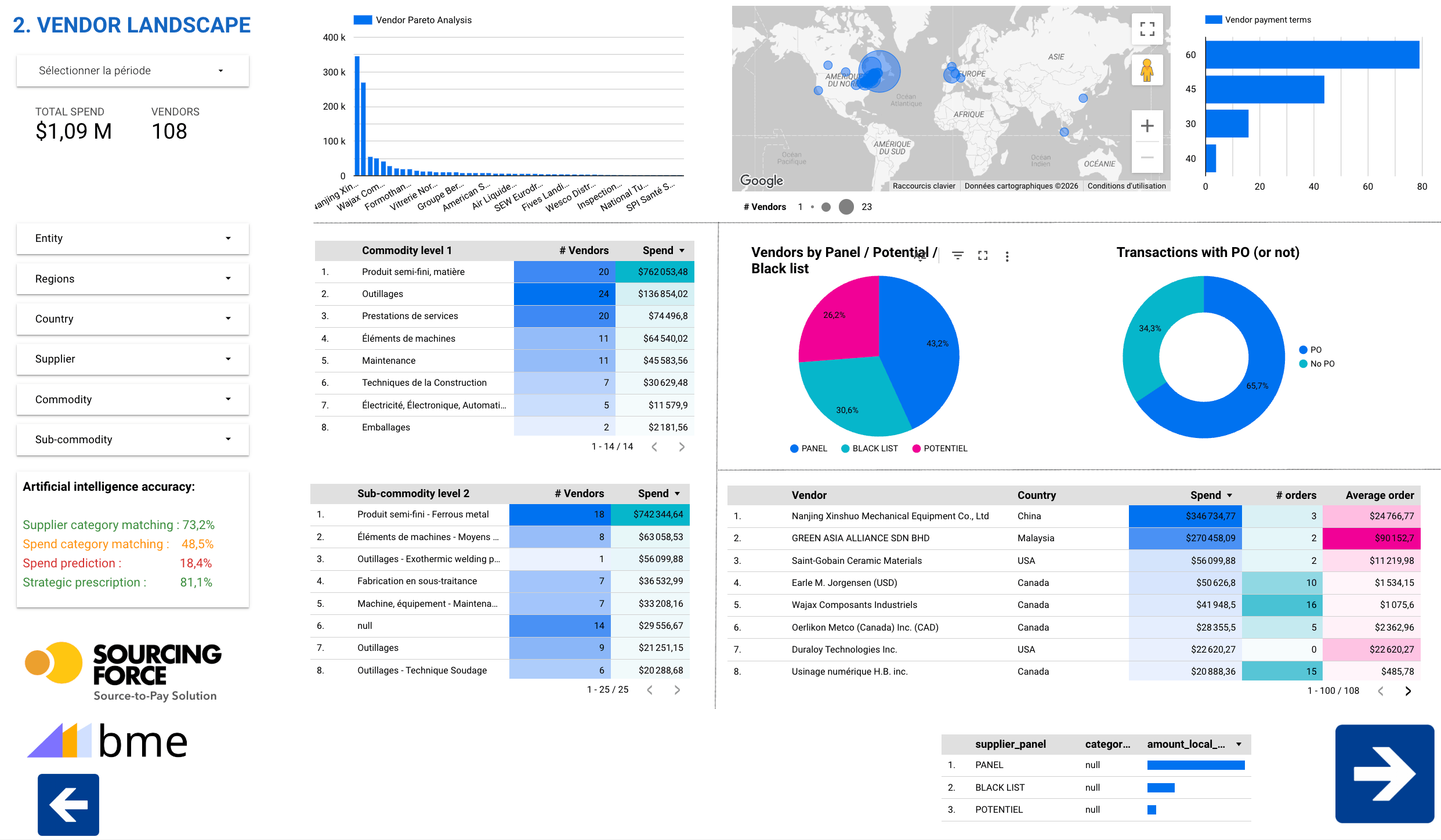
Supplier management organises information and relationships needed for purchasing. It connects supplier identity, contacts, active requests and the discussions needed to process them. Master data quality matters as much as the number of records.
For class C purchases, an infrequently used supplier can create several administrative tasks. Distinguish what belongs in your supplier database from what falls within purchases assigned to BME. This clarifies contacts and responsibilities.
Gather the required documents and track their validity in the supplier file. Requirements depend on the need and applicable framework.
Check bank details and any changes before using them. Route anomalies to an appropriate review.
Include the supplier's financial position and warning signs in risk assessment and order tracking.
Information that matters
Connect the legal name, contact details and people with the relevant file. A sales contact does not replace the person responsible for delivery or quote clarification.
Supplier discussions are centralised and recorded in Sourcing Force. Teams have the context to revisit a question, understand a response and continue processing.
Operation and payment tracking helps locate the file in the process. A payment status provides information; it is not a banking transaction executed by the software.
A clear workflow
Information moves between teams. Responsibilities stay clear.
Identify the reference system and information needed for each workflow.
Connect the supplier with the requests and contacts actually involved.
Have designated owners review information and exceptions.
Assign updates and discrepancy resolution to an identified team.
A preparation checklist
| Scope | What to organise | Purpose |
|---|---|---|
| Supplier identity | Selected reference, entity and contact details | Avoid confusion between contacts |
| Request and communications | Quotes, questions and answers | Understand current processing |
| Client master data | Cost centres, projects, categories | Connect the operation to your organisation |
| Supplier performance | Criteria, period and observed facts | Prepare an evaluation separate from the supplier record |

A practical scope
The 2016–2017 Roche Diabetes Care France project includes a supplier portal designed to bring together information and communications with external contacts. This page covers supplier relationships and records; commitments and approvals are detailed in the contracts workflow.
Your initial scope
Your ERP/S2P remains the system of record for rules, approvals, commitments and orders. Cost centres, projects and categories are configured or exchanged through APIs within the chosen scope. Identify the source and owner of every data item.
For purchases assigned to BME from suppliers already registered within the agreed scope, BME can handle the operational relationship and avoid creating a record in your own database. The choice depends on the transferred operations, not just how rarely a supplier is used.
Start with a few class C suppliers and representative files. Review scattered information, rework and unanswered questions. The demo connects these situations with communication and tracking.
One portal, several purchasing workflows

Small laboratory equipment, maintenance and one-off services need precise information even when their cost is low.
Explore the process →
A missing part, a consumable or a local service can involve several teams for a single order.
Explore the process →
Urgent maintenance should not lead to a lost quote or an untracked supplier record.
Explore the process →
Work at remote sites multiplies urgent orders, small supplies and local suppliers.
Explore the process →
Counter purchases and unexpected needs may proceed before the site, budget and documents are properly identified.
Explore the process →
Handling equipment, consumables and maintenance generate scattered orders across multiple warehouses.
Explore the process →
Each outlet orders point-of-sale materials, services or travel from different contacts.
Explore the process →
Low-value requests may be scattered across departments without a shared view of needs or commitments.
Explore the process →
Event bookings, venues and one-off travel services involve project teams, business departments and procurement.
Explore the process →Prepare your project
Management covers information, communications and operations. Evaluation examines performance against defined criteria and over a defined period. The two approaches complement one another but remain distinct.
No. Sourcing Force provides online tracking of supplier payments. Execution and financial responsibilities follow the arrangements agreed with the client and, where applicable, BME.
This depends on the chosen workflow. For purchases assigned to BME from suppliers already registered within the agreed scope, BME can handle the operational relationship.
Your next step
Let's discuss your class C purchases and how your organisation works.
Request your free assessment.