Quote reading and extraction
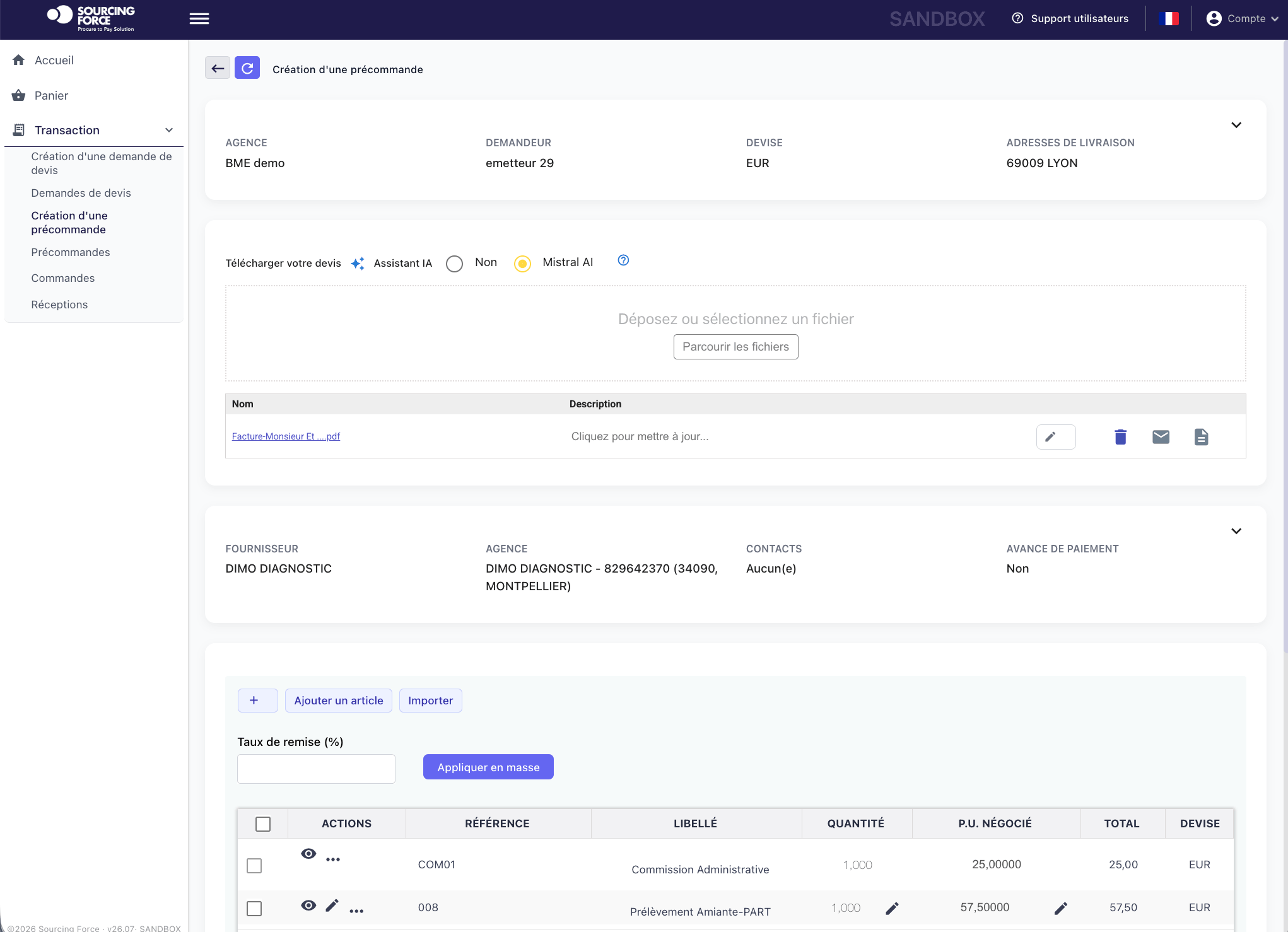
Extract useful information from a quote — supplier, items, quantities and prices — to prepare a structured purchasing file.

Procurement artificial intelligence
Read a quote, structure a request, identify a discrepancy: focus your teams on useful decisions. Sourcing Force connects tail spend information and tasks within your procurement rules.
Sourcing Force + Buy Made Easy
Reading a quote, assessing a request and checking its documents takes time before the procurement decision is even made.
Sourcing Force centralises these files and uses AI to structure information, detect discrepancies and prepare actions.
Buy Made Easy complements the digital workflow as the single supplier for outsourced purchases.
An operational objective
Procurement automation organises task execution using data, rules and triggers. Artificial intelligence supports reading information, structuring it and examining discrepancies. Start with the purchasing need and the decision to prepare.
Across classes B and C, varied quotes and requests take up team time before an order is even committed. A structured file makes information easier to use: supplier, items, quantities, terms and supporting documents.
Choose tasks to automate by following a real request. Identify the data needed, expected result, responsible person and situations requiring special review. This gives AI a clear role in the workflow.
From quote to request
The quote and supporting documents populate the file.
Data fills the request fields.
Discrepancies and missing information are highlighted.
The request follows the workflow's rules and permissions.
Uses of AI in procurement
Complementary tasks to organise around your information and processing rules.
Extract useful information from a quote — supplier, items, quantities and prices — to prepare a structured purchasing file.
Organise the requirement, identify missing information and prepare to direct it to the appropriate purchasing workflow.
Turn the information collected into an actionable purchase requisition with its line items and supporting documents.
Check that the expected documents are present and consistent, then highlight the points needing review.
Bring supplier information together and flag inconsistencies relevant to reviewing the purchasing file.
Compare bank details with the information in the file to identify discrepancies to resolve before payment.
Organise the customs data and documents needed for an international purchase and highlight missing information.
Compare line items, quantities and amounts across the three documents to highlight discrepancies.
Identify inconsistencies in purchasing data and help the team prioritise their review.
Prepare supplier searches and response comparisons based on the stated requirement.
When autonomous mode is enabled, let the autonomous workflow carry out sourcing within the agreed scope.
When autonomous mode is enabled, let the autonomous workflow negotiate within the limits defined for the project.
How it works
AI prepares information, flags discrepancies and supports searches. Teams review the file and make the decisions required by the organisation.
This mode helps focus attention on understanding needs, comparing offers and handling exceptions.
When autonomous mode is enabled, sourcing or negotiation can run without human intervention within the agreed scope.
Define objectives, limits and escalation rules. The chosen mode follows your organisation's responsibilities and procurement framework.
The file in the application
The pre-order brings together the supplier, contacts, quote and items. It structures the file that continues through the purchasing workflow.
Integrated AI tools
 Mistral AI
 OpenAI
 Anthropic
Define the use case and required data first. Processing quality depends on the structure of the file, checking rules and how exceptions are handled.
Build your scenario
Gather an anonymised quote or request. Identify useful fields and the result the team needs. Specify where the document fits into the workflow and which system holds the reference data.
Review missing information, discrepancies and supplier responses to compare. Connect each situation to the person responsible and the next action.
Sourcing Force provides the specialist application; BME Consulting delivers assigned outsourcing services. Software and services can be combined or used separately. This division clarifies who prepares, who processes and who decides.
A free Tail Spend Assessment helps identify priorities. A focused demo can then walk through the information and actions in a representative file.
Explore BME outsourcing ↗Prepare your project
Prepare an anonymised quote, the associated need and the expected purchase request fields. Include your approval rules and relevant checks so the discussion can follow a practical case from start to finish.
Assistance prepares information and actions for the team. When autonomous mode is enabled, sourcing or negotiation runs within defined boundaries. Choose the mode according to assigned tasks, decision rules and exceptions that need escalation.
It compares line items, quantities and amounts to highlight discrepancies. The team can then review differences in context and handle exceptions under its procurement and finance rules.
Your next step
Let's discuss your class C purchases and how your organisation works.
Request your free assessment.